Add Sayso to Chrome
Sayso is a Chrome extension - it installs in one click and lives in your toolbar, ready on any site. It also works in Chromium browsers like Edge and Brave.
- 1Click Add to Chrome on the Sayso store listing, then Add extension when Chrome asks.
- 2Click the puzzle-piece icon in your toolbar and pin Sayso, so it's always one click away.
Sign in with a code
Open the Sayso side panel (click the Sayso icon in your toolbar) and pop in your email. We send a one-time code - type it in and you're in. No password to create or remember, ever. You only do this once per device.
Record your first review
- Open the website you want to review in Chrome, then open the Sayso side panel.
- Press Record review (with video) or Screens only.
- Talk naturally. Click anything on the page to pin it - it glows orange while Sayso listens. When your sentence lands, a green tick confirms it and the pin releases, ready for the next thing.
- Press Stop. Every sentence is now a point with a screenshot of the exact element you meant. Press Sayso to publish - the client link lands on your clipboard.
Send the link - here's what your client sees
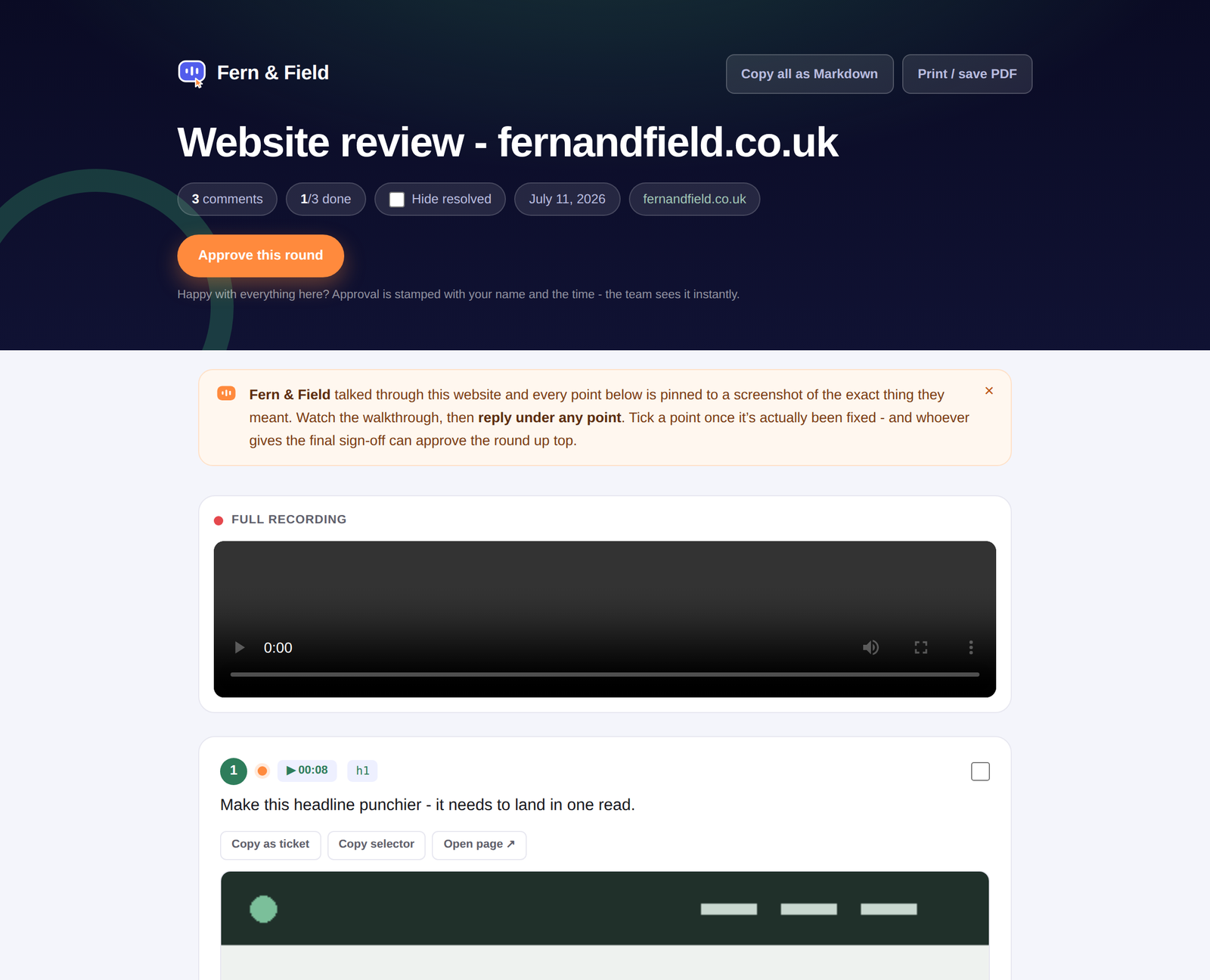
Paste the link into an email, WhatsApp, wherever your client lives. They open one link - no account, no login - and get this:
 1
2
3
1
2
3
- 1Approve this round - one tap signs off the whole review, stamped with their name and the time. You get an email instantly.
- 2The full recording plays back, and each point lights up at the moment it was spoken.
- 3Every point carries its own screenshot. The client can reply under any point (first name asked once); your team can copy it as a ticket or grab the CSS selector.
Track it all in your portal
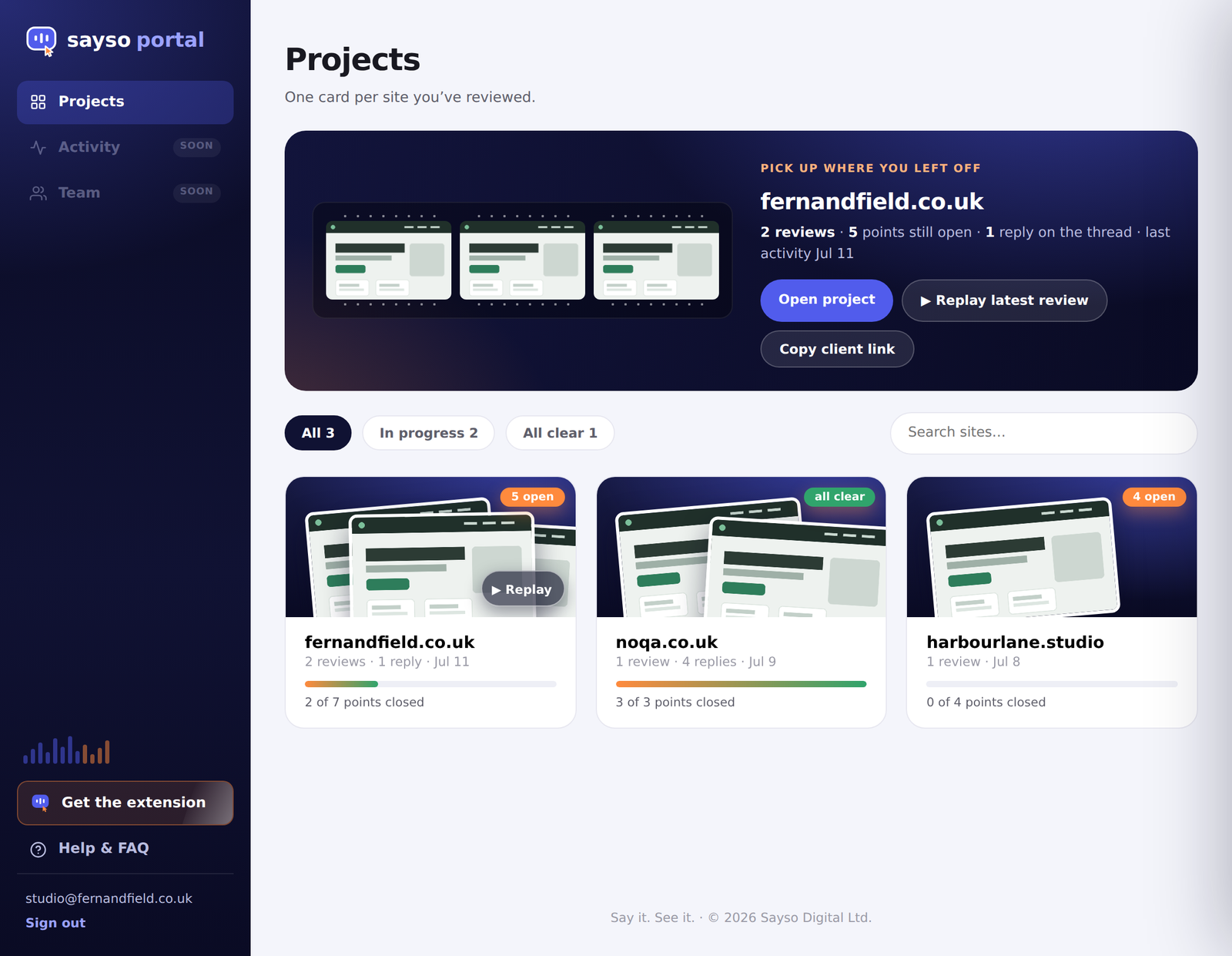
Your portal at sayso.digital/portal is home base - one card per site you've reviewed, and everything the client does shows up here live.
 1
2
3
1
2
3
- 1Pick up where you left off - your latest project, one click to open, replay or copy the client link.
- 2Filter by status (all / in progress / done) or search by site name.
- 3One card per site. A ▶ Replay badge appears on any project that has a video review.
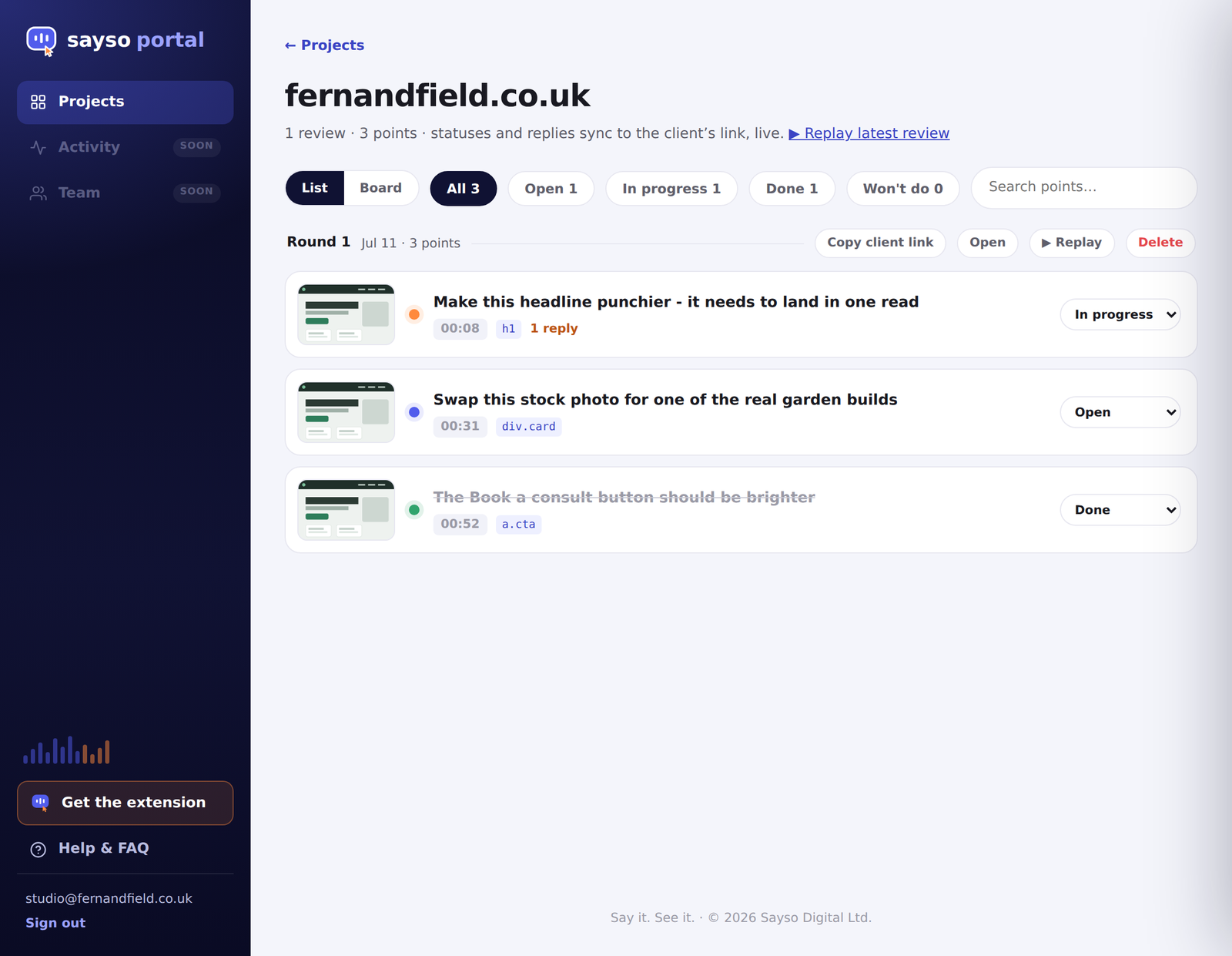
Open a project to run the work:
 1
2
3
1
2
3
- 1Filter and search points, or switch between List and Board views.
- 2Each review is a numbered round - copy its client link, open or replay it here.
- 3Move each point Open → In progress → Done / Won't do. It syncs to the client's link the instant you change it.
Live Fix - say the change, see it happen
Sometimes describing isn't enough. Live Fix lets you make the change while you talk - on the real page, reversibly - then send one link for sign-off.
- In the side panel, open Live Fix and press Pick an element to change, then click anything on the page. Picked the wrong thing? Esc unpins it and starts the picker again.
- Just say the change - "make the heading white and a bit bolder" - the mic is already listening (or type it and press Enter). The moment you pause, Sayso applies it to the page; tap the other options to compare, toggle before/after, keep it or undo it.
- Press Share for approval. One link shows every change as a before/after - your client approves or asks for a tweak, no account needed, and you can discuss under any change.
- You get an email when they respond, and your developer gets paste-ready CSS (selectors included, old values in comments) at the bottom of the same link.
Make it yours
In the extension: Settings → Report branding. Your studio name, logo and accent colour take over the client-facing pages - Sayso stays out of sight. White-label comes with Solo and Studio.
Your data
Unpublished capture state starts in the extension. Publishing stores the review and private media in Sayso's Supabase project behind an unlisted share link; speech and AI features use the processors explained in our privacy policy. Sayso does not run an advertising tracker, and the portal provides review, Live Fix and permanent account deletion controls.
Stuck?
Email support@sayso.digital - a human reads it, usually the same day. Or ask the little Sayso helper in the corner of this page.